
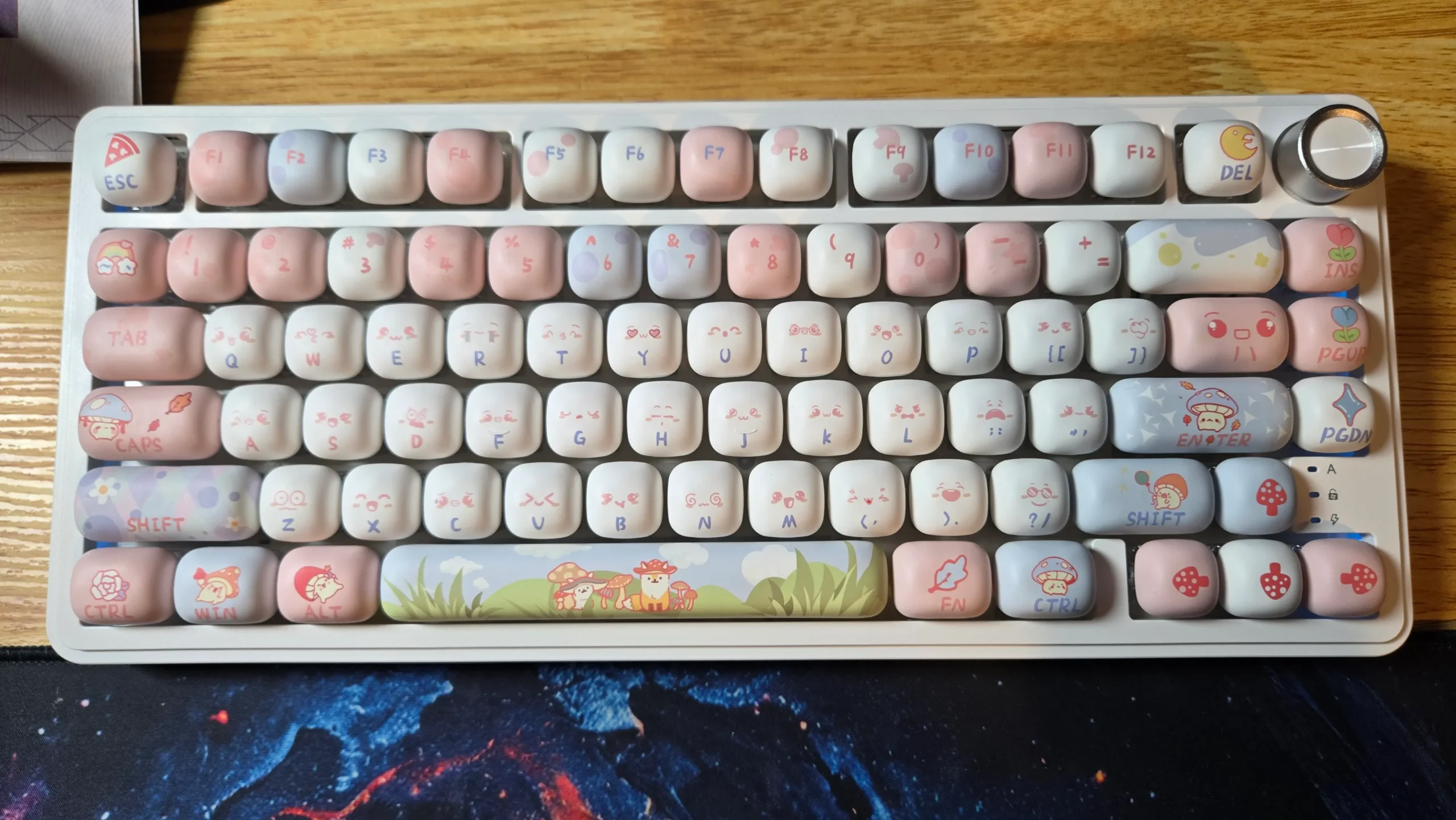
The stock keycaps on a keyboard are functional, but they rarely express your personal style. Upgrading them is one of the easiest and most impactful mods you can perform. This guide follows the complete installation of the XVX Fox Party keycap set onto an XVX M75 Lumina 75% keyboard, showcasing the visual transformation, the unique feel of the MOG profile, and how to solve common fitment issues.
As an Amazon Associate, I earn from qualifying purchases #commissionsearned ► M75 Lumina Keyboard:
(XVX Website) – (Amazon)
► Fox Party KeyCaps: (XVX Website)
► Keyboard Best Sellers: (Amazon)
Unboxing the XVX Fox Party 138-Key Set
The kit arrives impressively comprehensive. It includes the complete 138-key set, providing overwhelming compatibility for almost any ANSI-layout keyboard from 61% to full-size. The included keycap puller is a thoughtful addition. The first thing you notice is the vibrant, dye-sublimated color scheme and the sharp, legends that will not fade. The plastic has the distinctive, slightly textured feel of high-quality PBT.
The Key Difference: Understanding MOG Profile
Before installation, it’s crucial to understand the main upgrade: the keycap profile. Profile refers to the shape and height of each key. The XVX Fox Party set uses the MOG profile, a unique, sculpted design that differs significantly from the stock keycaps on most boards like the M75 Lumina. MOG profile keycaps often have a distinct curvature and row height that can change the typing angle and feel, promoting a more ergonomic finger position.
Step-by-Step Installation Process
The installation process is methodical and satisfying. Using the supplied puller, the old keycaps are carefully removed by pulling straight up to avoid damaging the switches. Installing the new set begins with the alphanumeric keys, followed by the modifiers. The sheer number of keys in the 138-key set means you have multiple options for many positions, allowing for further customization. The process highlights the precise fit over the MX-style switches.
Troubleshooting a Common Fitment Issue
A common challenge arises with larger stabilized keys, such as the spacebar, shift, or enter keys. During this installation, one of these keys did not fit the stock stabilizers on the M75 Lumina. This is not a defect, but a normal compatibility consideration. The solution is simple: the extensive kit includes several alternate keycaps of different sizes for these very modifiers. Swapping to an alternate key that matches the stabilizer layout solved the problem immediately, demonstrating the value of a comprehensive set.
Final Result: Sound, Feel, and Aesthetics
Once fully installed, the transformation is dramatic. The keyboard is visually revitalized with a new personality. Beyond looks, the change in acoustics is notable. The thick PBT plastic produces a deeper, more solid sound compared to thinner stock caps. The textured surface of the PBT provides a grippier feel, and the MOG profile offers a distinct typing experience that many users find more comfortable for extended periods.
Conclusion and Recommendation
The XVX Fox Party keycap set is an excellent upgrade for anyone looking to personalize their mechanical keyboard. The dye-sublimated PBT construction promises longevity, the MOG profile offers a unique feel, and the enormous 138-key count ensures compatibility with most boards. The installation process is straightforward, and as shown, even minor fit issues are easily resolved thanks to the generous assortment of keys. For a burst of color and quality, this set delivers.
As an Amazon Associate, I earn from qualifying purchases #commissionsearned ► M75 Lumina Keyboard:
(XVX Website) – (Amazon Link)
► Fox Party KeyCaps: (XVX Website)
► Keyboard Best Sellers: (Amazon Link)
Leave a Reply