
Table of Contents
Never Settle for Lag Again: Alienware Aurora RTX 5070 Review
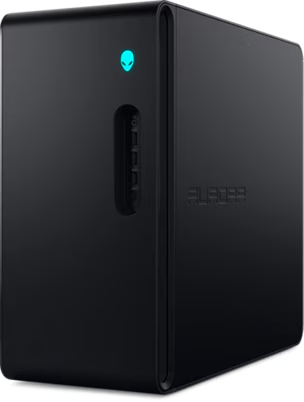
If you have been shopping for a mid-range gaming desktop that can handle modern titles without turning your room into a jet engine test facility, the Alienware Aurora ACT1250 deserves a serious look. This machine pairs an Intel Core Ultra 7 265F processor with an NVIDIA GeForce RTX 5070 GPU — and it does it inside one of the quietest chassis Alienware has ever shipped. I spent time with this machine running it through real gaming sessions and daily use, and I want to give you the honest picture before you spend your money.
As an Amazon Associate, I earn from qualifying purchases #commissionsearned
► Alienware Aurora ACT1250: Link (Amazon)
► PC Monitor Recommendations: Link (Amazon)
What Is the Alienware Aurora ACT1250
The ACT1250 is Alienware’s 2025 mid-range gaming desktop, sitting below the high-end Area-51 but well above entry-level gaming towers. It ships with 32GB of DDR5 RAM, a 1TB NVMe SSD, and a 1000W Platinum Rated power supply. The RTX 5070 is the headlining component here, built on NVIDIA’s new Blackwell architecture. Additionally, the system runs Windows 11 Home out of the box and includes a wired keyboard and mouse.
The chassis itself is a significant departure from older Aurora designs. Alienware says this generation is about 40% smaller by volume than the previous model and 53% smaller than the Area-51. In practice, it sits comfortably on a desk without dominating the space around it.
Key Features Worth Knowing
RTX 5070 and NVIDIA Blackwell Architecture
The RTX 5070 runs on NVIDIA’s Blackwell architecture, which brings meaningful upgrades over the previous generation. Most importantly for gamers, it supports DLSS 4 with Multi Frame Generation. This technology uses AI to generate additional frames between rendered frames, which produces significantly smoother gameplay without proportionally increasing GPU workload. In supported titles, the difference is noticeable immediately.
The GPU also features fourth-generation ray tracing cores, which handle lighting, shadows, and reflections more realistically than the prior generation. For competitive players, NVIDIA Reflex 2 with Frame Warp reduces system latency based on your most recent mouse input — a genuine advantage in fast-paced games.
Intel Core Ultra 7 265F Processor
The Core Ultra 7 265F is a 20-core processor with a maximum boost clock of 5.3GHz and 66MB of total cache. However, the feature that sets Intel’s Ultra series apart is the built-in NPU — a dedicated neural processing unit for AI-accelerated tasks. This matters increasingly for streaming, content creation, and AI-assisted features in modern games. For standard gaming workloads, the 20-core configuration handles background tasks, game logic, and audio processing without creating bottlenecks for the GPU.
Thermal Design and Acoustics
This is where the ACT1250 genuinely impresses. Alienware replaced the liquid cooler from the previous Aurora generation with an air cooling solution, and the result is a dramatically quieter machine. The hexagonal side vents, top exhaust, and front stadium intake work together to push air through efficiently. Alienware claims 20% quieter operation and 7% lower temperatures compared to the Aurora R15. Based on real customer feedback, the quiet operation holds up even during extended gaming sessions.
Real-World Performance
Customer impressions of this machine are consistently positive on the performance front. Owners report smooth, stutter-free gameplay across a range of titles including Ghost of Tsushima and other demanding games on high settings. One long-term owner noted the system had been running for over six months through multiple driver updates — including GPU driver updates — without a single blue screen or stability issue. That kind of driver stability has historically been a weak point for gaming desktops, so it is worth noting.
Setup is straightforward. Several owners mention being up and running within 20 minutes of opening the box. The front I/O includes USB-C with Power Share, which keeps devices charged even when the system is powered down — a small but genuinely useful feature.
One issue worth flagging: a small number of buyers have reported the system occasionally refusing to start. A full power discharge — unplugging the system completely for 30 seconds — appears to resolve this. It is not a widespread issue, but it is real and worth knowing about before you buy.
Pros and Cons
Pros:
- RTX 5070 with Blackwell architecture delivers excellent performance for the price tier
- Exceptionally quiet operation compared to previous Aurora generations and competing systems
- Clean, compact chassis is 40% smaller than the prior model
- Strong driver and software stability reported over long-term use
- Alienware Command Center gives full control over lighting, performance modes, and per-game profiles
- 10 USB ports including USB 4, USB-C, and Power Share technology
- 1000W Platinum Rated PSU gives plenty of headroom for future upgrades
Cons:
- Memory is limited to 32GB maximum with two slots — no room to add more beyond that ceiling
- Boots slowly, with some users reporting startup times around two minutes
- Occasional startup failure requiring a power discharge to resolve
- Some listings show conflicting spec configurations — verify your specific model number before purchasing
- 1TB storage fills up quickly with modern game file sizes
Who Should Buy the Alienware Aurora ACT1250
This desktop is the right choice for the gamer who wants a serious, ready-to-play machine without building from scratch. Specifically, it suits casual to competitive gamers who want reliable 1440p and capable 4K performance, a quiet system for a home office or bedroom setup, and the peace of mind that comes with Dell’s one-year onsite service warranty.
It is not the best fit for professional content creators who need more than 32GB of RAM, or for buyers who want liquid cooling as a baseline. If storage space is a priority for your game library, budget for an additional NVMe drive — the system has a spare M.2 slot ready to go.
At its price point, the Alienware Aurora ACT1250 delivers honest, well-rounded performance in a chassis that has finally solved the noise problem that plagued earlier versions. It earns a recommendation.
Internal link suggestion: Link the phrase “gaming desktop buying guide” to a related post on your site.
External link suggestion: Link the phrase “DLSS 4” to NVIDIA’s official DLSS 4 page at nvidia.com.
Frequently Asked Questions
Does the Alienware Aurora ACT1250 come with a keyboard and mouse?
Yes. The ACT1250 includes a Dell wired keyboard and a wired mouse in the box, along with the power cord and documentation. However, neither peripheral is designed for competitive gaming. Most serious gamers will want to replace them with preferred peripherals shortly after setup.
Can you upgrade the RAM in the Alienware Aurora ACT1250?
The system ships with 32GB of DDR5 RAM installed across two slots, and 32GB is the maximum supported capacity. That means you cannot upgrade beyond what is already installed. For most gaming workloads this is sufficient, but it is a firm ceiling to know about before buying.
Is the Alienware Aurora ACT1250 good for 4K gaming?
The RTX 5070 with DLSS 4 Multi Frame Generation makes 4K gaming very capable on this system. With DLSS 4 enabled in supported titles, frame rates at 4K resolution are smooth and visually impressive. However, native 4K without DLSS assistance will push the GPU harder on the most demanding titles. For 1440p gaming, this system has significant headroom.
How loud is the Alienware Aurora ACT1250 during gaming?
Noticeably quiet for a high-performance gaming desktop. Alienware’s shift to air cooling in this generation, combined with the hexagonal vent design, keeps fan noise well below what most competing systems produce at similar load levels. Multiple long-term owners specifically call out the quiet operation as one of the machine’s standout qualities.
What warranty does the Alienware Aurora ACT1250 include?
It includes a one-year basic onsite service warranty through Dell. If a hardware issue cannot be resolved remotely, Dell will send a technician to your home or office. Extended warranty options are available for purchase through Dell’s website.
As an Amazon Associate, I earn from qualifying purchases #commissionsearned
► Alienware Aurora ACT1250: Link (Amazon)
► PC Monitor Recommendations: Link (Amazon)
For full official specifications, visit the Alienware Aurora Gaming Desktop
Leave a Reply