
Table of Contents
If you have been searching for a mid-range gaming desktop that handles modern titles without demanding a premium price, the MSI Codex Z2 A8NVP-436US deserves a serious look. This machine pairs an AMD Ryzen 7 8700F processor with an NVIDIA GeForce RTX 5070 GPU — and it does it inside one of the most upgradeable chassis MSI has ever offered at this price point. I went deep on the specs, real-world gaming results, and long-term ownership picture so you can decide if this is the right machine before you spend your money.
As an Amazon Associate, I earn from qualifying purchases #commissionsearned
► MSI Codex Z2 A8NVP-436US: Link (Amazon)
► Gaming Monitor Recommendations: Link (Amazon)
What Is the MSI Codex Z2
The MSI Codex Z2 A8NVP-436US is MSI’s 2025 mid-range gaming desktop, and it sits in a competitive spot between budget entry-level towers and high-end flagships. It ships with 32GB of DDR5 RAM, a 2TB NVMe SSD, and an RTX 5070 GPU with 12GB of GDDR7 memory. Additionally, the system runs Windows 11 Home out of the box and includes a wired MSI keyboard and mouse. The 2TB storage is a notable upgrade over the 1TB drives common in competing systems at this price.
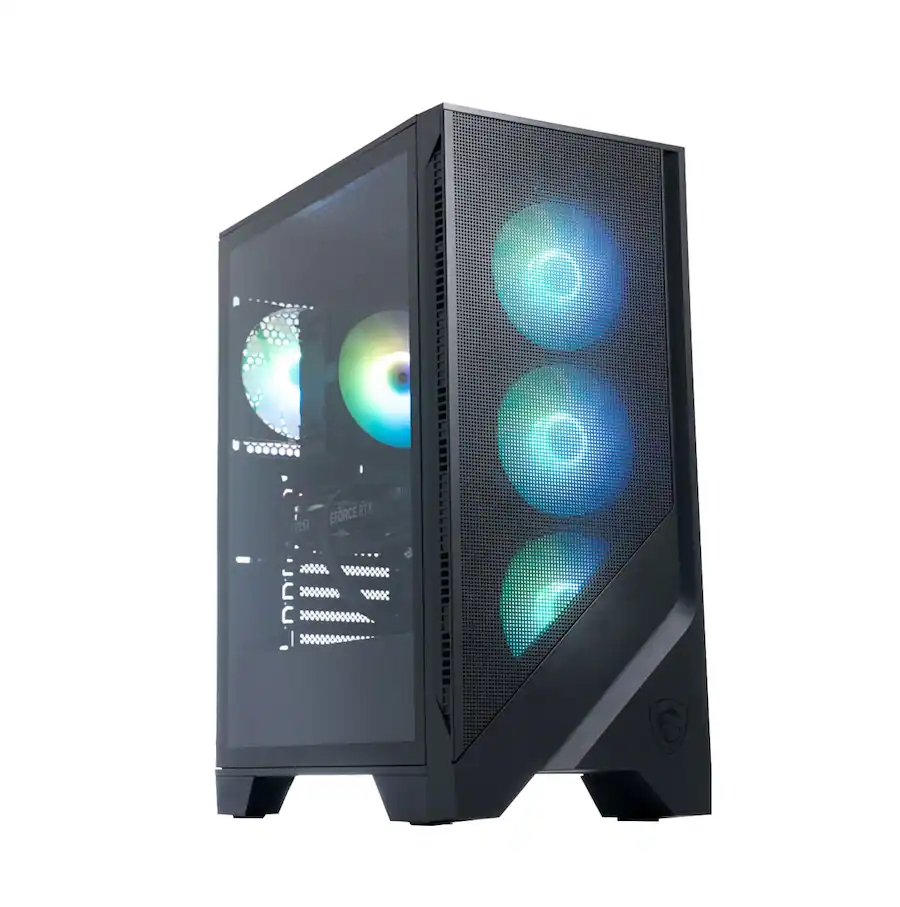
The chassis uses a mesh-style front panel design that MSI says drastically increases airflow compared to previous generations. A tempered glass side panel shows off the internals, and built-in RGB lighting runs throughout. Consequently, the Codex Z2 looks the part on a desk whether the lights are on or off. MSI also proudly notes this system is assembled in America using standardized components — a practical benefit that makes repairs and upgrades more straightforward.
MSI Codex Z2 Key Features
RTX 5070 and NVIDIA Blackwell GPU
The RTX 5070 is the headlining component of this mid-range gaming desktop. Built on NVIDIA’s Blackwell architecture, it supports DLSS 4 with Multi Frame Generation, which uses AI to produce smoother frame rates without proportionally increasing the GPU workload. In real-world testing by independent reviewers, the system averaged 77 to 86 fps in Cyberpunk 2077 at 4K with ray tracing and DLSS frame generation enabled — solid performance for a system in this class. Furthermore, competitive titles like Valorant and CS2 run at extremely high frame rates on high settings, making this a strong choice for high-refresh-rate monitor owners.
One limitation worth acknowledging upfront: the RTX 5070 is limited to 12GB of VRAM. As a result, anyone already running an RTX 4070 Super will find the upgrade less dramatic than expected. However, for buyers coming from older hardware or building their first gaming PC, the performance jump is substantial.
AMD Ryzen 7 8700F Processor
The Ryzen 7 8700F is an 8-core processor with a base clock of 4.1GHz and a boost clock reaching 5.0GHz, backed by 18MB of cache. For gaming workloads, it keeps up well alongside the RTX 5070 without creating meaningful bottlenecks in most scenarios. Moreover, because of the strong multi-core performance, tasks like streaming, video encoding, and running background applications alongside your game have minimal impact on frame rates. This makes the Codex Z2 a capable dual-purpose machine for gamers who also create content.
Frozr AI Cooling and Thermals
MSI’s Frozr AI Cooling is a genuine differentiator in this price bracket. Instead of fixed fan curves, the system learns and predicts temperature patterns and adjusts fan speed accordingly. In practice, this means the machine stays quieter during light tasks and ramps cooling precisely when gaming gets demanding. The mesh front panel supports this approach by providing significantly more passive airflow than the solid panels common on competing systems. Specifically, the Codex Z2 runs four system cooling fans — three front intake and one rear exhaust — alongside an ARGB CPU air cooler.
Real-World Performance
Independent reviews consistently describe the Codex Z2 as a strong performer at 1080p and 1440p. At 1080p with high settings, AAA titles run smoothly and competitive shooters push well beyond 100 fps in most cases. At 1440p, the RTX 5070 handles demanding games with visual settings tuned to high or ultra, especially when DLSS is active. For most buyers stepping into PC gaming or upgrading from an older system, this level of performance covers everything they are likely to play for the next several years.
The 2TB NVMe SSD is a real quality-of-life advantage. Modern AAA games routinely require 80 to 150GB each, so having double the storage of competing systems means you spend less time managing your library. Additionally, the standardized component design means swapping in more storage, additional RAM, or a future GPU requires no proprietary tools or special knowledge.
One honest limitation: in heavily modded games or with ray tracing pushed to maximum settings, you may need to lower some visual options to maintain smooth frame rates. Moreover, anyone playing at native 4K without DLSS assistance will find the RTX 5070 working harder than it does at 1440p. These are expected trade-offs for the price tier, not flaws specific to this machine.
Pros and Cons
Pros
- RTX 5070 with Blackwell architecture delivers strong 1080p and 1440p gaming performance
- 2TB NVMe SSD is double the storage most competing systems offer at this price
- Frozr AI Cooling learns temperature patterns for quieter, smarter fan management
- Mesh front panel provides significantly better airflow than solid-panel competitors
- VR-ready out of the box with USB Type-C front access
- Standardized MSI components make upgrades and repairs accessible
- Assembled in America with Wi-Fi 7 and 2.5GbE networking built in
Cons
- RTX 5070 is limited to 12GB VRAM — a modest upgrade for anyone coming from an RTX 4070 Super
- AMD Ryzen 7 8700F is a mature processor, not the latest generation available
- Native 4K gaming without DLSS pushes the GPU harder — best suited for 1080p and 1440p
- Included keyboard and mouse are basic — most serious gamers will replace them quickly
Who Should Buy the MSI Codex Z2
This mid-range gaming desktop is the right choice for first-time PC gamers and anyone upgrading from an older console or aging desktop who wants a capable, ready-to-play machine without building from scratch. Specifically, it suits gamers who play at 1080p or 1440p, want VR capability, and value a system they can upgrade over time without fighting proprietary parts.
It is not the best fit for buyers targeting 4K as their primary resolution, or for anyone already running a modern RTX 4070 Super who was hoping for a significant generational leap. Similarly, if you need more than 32GB of RAM for content creation workflows, a higher-spec configuration would serve you better.
At its price point, the MSI Codex Z2 A8NVP-436US delivers honest, well-rounded performance in a chassis built to last and grow with you. The 2TB storage, AI-assisted cooling, and standardized component design make it one of the more practical choices in the mid-range gaming desktop category for 2025. It earns a clear recommendation.
For more on picking the right gaming setup, check out our gaming desktop buying guide on the site.
For full official specifications, visit the MSI Codex Z2 official product page.
Frequently Asked Questions
Is the MSI Codex Z2 good for 1440p gaming?
Yes. The RTX 5070 handles 1440p gaming at high to ultra settings in most modern titles, especially with DLSS 4 enabled. For competitive shooters and mainstream AAA games, 1440p is the sweet spot for this system. Native 4K without DLSS is possible but will require lowering visual settings in the most demanding titles.
Can you upgrade the MSI Codex Z2 after purchase?
Yes, and this is one of the Codex Z2’s strongest selling points. MSI built it with standardized components specifically for upgradeability. RAM, storage, and the GPU can all be swapped using standard parts. Consequently, you can grow the system over time rather than replacing it entirely when your needs change.
Does the MSI Codex Z2 support VR?
Yes. The Codex Z2 is VR-ready out of the box. The RTX 5070 provides more than enough performance for current VR headsets, and the front USB Type-C port simplifies connecting modern VR hardware directly. Additionally, the system has the CPU and RAM headroom to handle VR workloads without bottlenecks.
How loud is the MSI Codex Z2 during gaming?
Noticeably quiet for a high-performance gaming desktop, thanks to Frozr AI Cooling. The system learns your usage patterns and adjusts fan speeds intelligently rather than running at a fixed high speed. However, under sustained heavy loads like extended 4K gaming sessions, fan noise increases as expected. Overall, it is quieter than most competing systems in this price range.
What Wi-Fi does the MSI Codex Z2 support?
The Codex Z2 A8NVP-436US includes Wi-Fi 7, which is the latest wireless standard and provides significantly faster speeds and lower latency than Wi-Fi 6. For online gaming, this means more stable connections and less interference in busy network environments. It also includes a 2.5 Gigabit Ethernet port for wired connections.
As an Amazon Associate, I earn from qualifying purchases #commissionsearned
► MSI Codex Z2 A8NVP-436US: Link (Amazon)
► Gaming Monitor Recommendations: Link (Amazon)
For full official specifications, visit the MSI Codex Z2 Official Page.
Leave a Reply