
Table of Contents
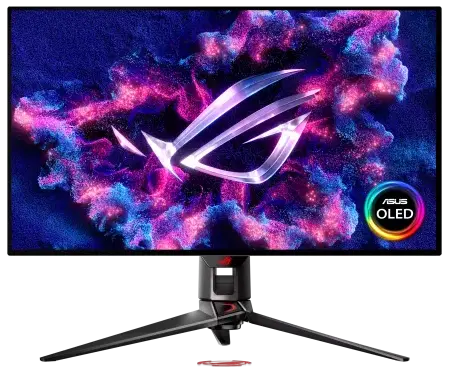
If you are shopping for a high-end 32-inch gaming monitor and want the best OLED experience available without choosing between resolution and refresh rate, the ASUS ROG Swift PG32UCDP OLED is one of the most capable panels on the market. It runs at 4K 240Hz for visually stunning gaming, then switches to 1080p 480Hz at the press of a button for competitive titles where motion clarity matters most. I went through the full spec sheet, real-world performance data from independent reviews, and long-term ownership considerations so you can decide if this monitor justifies its premium price.
As an Amazon Associate, I earn from qualifying purchases #commissionsearned
► ASUS ROG Swift OLED PG32UCDP: Link (Amazon)
► Budget Monitor Ideas: Link (Amazon)
What Is the ROG Swift PG32UCDP
The ASUS ROG Swift OLED PG32UCDP is a 32-inch WOLED gaming monitor built around LG’s W-OLED panel with an improved RGWB subpixel layout and MLA+ technology. The W in WOLED stands for white — meaning this is not a Quantum Dot display like the competing QD-OLED panels from Samsung. As a result, the WOLED panel delivers higher full-screen brightness than most QD-OLED competitors, measuring over 700 nits in HDR mode. Additionally, the matte anti-glare coating handles reflections well, making it a practical choice for rooms with ambient light.
This monitor sits at the top of ASUS’s ROG Swift lineup alongside the PG32UCDM, which uses a Samsung QD-OLED panel instead. The key differentiator of the PG32UCDP is its dual mode functionality — a feature that makes it uniquely versatile among 32-inch 4K gaming monitors. At around $1,300, it is a premium purchase that competes directly with LG’s UltraGear 32GS95UE-B, which uses the same underlying panel at a lower price but lacks the ROG feature set.
ROG Swift PG32UCDP Key Features
Dual Mode: 4K 240Hz and 1080p 480Hz
The headline feature of the ROG Swift PG32UCDP is its dual mode display. A single hotkey switches the panel between 4K resolution at 240Hz and 1080p resolution at 480Hz. In practice, most gamers will use 4K 240Hz for visually demanding titles like Cyberpunk 2077 and open-world games. Then they switch to 480Hz for competitive shooters like Valorant or Counter-Strike, where motion clarity and input responsiveness matter more than pixel count. The 1080p mode looks sharper than expected because each block of four pixels effectively becomes one larger pixel, preserving clarity better than a typical 1080p panel.
The 480Hz refresh rate is the highest available on a consumer OLED panel as of 2025. Combined with the OLED panel’s 0.03ms response time, motion clarity at 480Hz is exceptional. Furthermore, G-SYNC Compatible and FreeSync Premium Pro certification means variable refresh rate works correctly regardless of whether you are running an NVIDIA or AMD graphics card.
WOLED Panel Image Quality and HDR
The WOLED panel covers 99% of the DCI-P3 color gamut with True 10-bit color depth. Contrast is effectively infinite because OLED pixels turn off completely for black content — a characteristic no LCD panel can match. In HDR mode, peak brightness exceeds 700 nits for a 25% window, which is significantly higher than QD-OLED competitors that typically measure around 450 nits in the same test. Consequently, HDR highlights in games and movies appear with more impact and depth than on competing OLED panels.
For text and productivity work, the RGWB subpixel layout delivers noticeably improved text clarity compared to older WOLED panels. While QD-OLED still holds a slight edge in text rendering, the difference is small enough that most users will not find it a concern for mixed gaming and productivity use.
Custom Heatsink, Connectivity, and Burn-In Protection
ASUS uses a passive custom heatsink instead of a cooling fan for thermal management. This is important for two reasons. First, it means the monitor operates completely silently under all conditions. Second, the heatsink actively helps reduce the risk of OLED burn-in by keeping panel temperatures lower during extended use. ASUS backs this up with a three-year warranty that explicitly covers panel burn-in — better coverage than most competing OLED monitors offer.
Connectivity covers all the essential bases. The rear panel includes one DisplayPort 1.4 with DSC, two HDMI 2.1 48 Gbps ports, and a USB-C port with DisplayPort Alt Mode and 90W power delivery. Additionally, a built-in three-port USB 3.2 hub and KVM switch allow you to connect two computers and switch between them with a single input — a practical feature for anyone running a dual-system desk setup. All ports support full 4K 240Hz, though DSC compression is required for HDMI and DisplayPort at that spec.
Real-World Performance
Independent reviewers consistently describe the PG32UCDP as one of the best 32-inch gaming monitors available. The 4K OLED image quality at 240Hz is described as jaw-dropping — excellent contrast, great sharpness, and strong color performance make games, movies, and photos all look outstanding. The dual mode feature works as advertised, with the 1080p 480Hz option looking sharper than the resolution number suggests. For competitive gamers who want both a premium single-player visual experience and a competitive-grade high refresh rate, no other monitor currently offers this combination in one panel.
The USB-C 90W power delivery is genuinely useful for laptop users. Connecting a MacBook or gaming laptop via a single USB-C cable provides both video output and charging simultaneously. Note that when using 90W PD, the monitor limits brightness to around 140 nits — switching to 65W restores full brightness. For most USB-C laptop connections, the 65W option is the better daily choice.
One honest limitation worth considering: the tri-point stand takes up significant desk space and positions the monitor closer to the viewer than competing stands. If your desk is shallower than 27 inches, this may feel cramped. Switching to a VESA monitor arm resolves this completely since the monitor is 100x100mm VESA compatible. Additionally, at $1,300 this monitor is priced at a premium over comparable 32-inch 4K OLEDs from MSI and Alienware that start below $1,000. The dual mode and ROG feature set justify the price for the right buyer — but anyone who will not use 480Hz mode can save significantly with an alternative.
Pros and Cons
Pros
- Dual mode switches between 4K 240Hz and 1080p 480Hz with a single hotkey
- WOLED panel delivers over 700 nits HDR brightness — significantly brighter than QD-OLED competitors
- 0.03ms response time and infinite contrast ratio from true per-pixel OLED lighting
- Passive custom heatsink keeps the monitor completely silent and helps reduce burn-in risk
- 3-year warranty explicitly covers panel burn-in — better than most OLED competitors
- USB-C 90W power delivery charges laptops via a single cable connection
- Built-in KVM switch supports two computers on one monitor and keyboard/mouse setup
- G-SYNC Compatible and FreeSync Premium Pro support both NVIDIA and AMD GPU users
Cons
- $1,300 price is a significant premium over competing 32-inch 4K OLEDs starting below $1,000
- Tri-point stand occupies substantial desk space and sits closer to the viewer than most competitors
- USB-C 90W PD limits brightness to around 140 nits — use 65W for full brightness
- Matte coating adds slight graininess visible on solid colors — glossy QD-OLED panels look crisper
- DSC compression required for 4K 240Hz over DisplayPort and HDMI — though real-world impact is negligible
- OLED burn-in risk remains for static content in long productivity sessions despite ASUS care features
Who Should Buy the ROG Swift PG32UCDP
This monitor is the right choice for serious gamers who want both a premium 4K single-player visual experience and a legitimate competitive high refresh rate option in one display. Specifically, it suits players who split time between immersive open-world games and fast-paced competitive shooters, laptop users who want USB-C connectivity with 90W charging, and anyone running a dual-system desk setup who will use the KVM switch regularly.
It is not the right fit for buyers who primarily use their display for productivity and office work — the OLED burn-in risk from static elements like taskbars and document margins makes it a risky choice for all-day desk use. Similarly, if you will not realistically use the 480Hz mode, competing 32-inch 4K OLEDs from MSI or Alienware offer comparable image quality for several hundred dollars less. The dual mode feature is the purchase justification here — make sure it fits your actual use case before paying the premium.
For gamers who will use both modes, the ROG Swift PG32UCDP is the best dual-mode OLED gaming monitor available in 2025. It earns a strong recommendation for the right buyer at its price point.
For more on building around this monitor, check out our gaming desktop reviews on the site.
For full technical specifications, visit the ASUS ROG Swift PG32UCDP official product page.
Frequently Asked Questions
What is dual mode on the ROG Swift PG32UCDP?
Dual mode lets you switch the monitor between two display configurations with a single hotkey. The first is 4K resolution at up to 240Hz, ideal for visually demanding games and content. The second is 1080p resolution at up to 480Hz, ideal for competitive titles where motion clarity and response time matter more than image sharpness. The switch happens instantly and requires no software — just a dedicated button on the monitor or a keyboard shortcut.
Is OLED burn-in a real concern with ROG Swift PG32UCDP?
It is a known characteristic of all OLED panels, not specific to this monitor. ASUS includes several burn-in mitigation features including pixel refresh cycles, pixel shift, and the custom heatsink that reduces panel temperature. Additionally, ASUS provides a three-year warranty that explicitly covers burn-in, which is better than most competitors offer. For gaming use, burn-in risk is low. For all-day productivity with static taskbars and application interfaces, the risk increases over years of use and an IPS or LCD panel would be a safer long-term choice.
Does the ROG Swift PG32UCDP work with PS5 and Xbox Series X?
Yes. Both HDMI 2.1 ports support 4K at up to 120Hz for console gaming, which covers the maximum output of both the PS5 and Xbox Series X. Variable refresh rate via HDMI 2.1 VRR is also supported for compatible console titles. The 240Hz and 480Hz modes are only available via PC with a compatible graphics card — consoles are limited to 120Hz maximum over HDMI.
What graphics card do I need to run 4K 240Hz on ROG Swift PG32UCDP?
You need a current-generation high-end GPU to consistently push 240 frames per second at 4K in demanding titles. An RTX 5080, RTX 4090, or RX 7900 XTX are the most capable options currently available. However, with DLSS 4 or FSR 3 enabled in supported games, even an RTX 5070 can achieve high frame rates at 4K. The 1080p 480Hz mode is more accessible and can be driven by a wider range of mid-range GPUs in competitive titles.
How does the ROG Swift PG32UCDP compare to the PG32UCDM?
Both are 32-inch 4K 240Hz ROG monitors priced at around $1,300. The key differences are the panel type and the dual mode feature. The PG32UCDP uses an LG WOLED panel, offers dual mode with 480Hz at 1080p, uses a passive heatsink, and has a matte coating. The PG32UCDM uses a Samsung QD-OLED panel, does not have dual mode, includes Dolby Vision support, and has a glossy finish. Choose the PG32UCDP if you want dual mode and a matte coating. Choose the PG32UCDM if you prefer a glossy display and Dolby Vision for movie content.
As an Amazon Associate, I earn from qualifying purchases #commissionsearned
► ASUS ROG Swift OLED PG32UCDP: Link (Amazon)
► Budget Monitor Ideas: Link (Amazon)
For full official specifications, visit ROG Swift OLED PG32UCDP.
Leave a Reply